file permissions in linux
permission groups
every file/dir has 3 permission groups in linux:
- owner/user
- group
- others
each group has 3 permissions:
- read
- write
- execute
ex - drwxrwxr-x means the following:
splitting into parts: d rwx rwx r-x
- d - stands for dir, if its a file, it will be ”-”
- rwx - for the owner (rwx means the owner can r-read, w-write and x-execute)
- rwx - for the group (so the group can also read, write and execute)
- r-x - for other users (can read, can’t write but can execute)
How to change the permissions?
- chown - changing owner and group
sudo chown aniket <filename> # changes owner
sudo chown aniket:org <filename> # changes group and owner- chmod - change mode
for changing a file using chmod we need to use the decimal equivalent numbers for “rwx” which are:-
- r= 4
- w= 2
- x= 1
so, lets say a group has all three permissions read, write and execute, it’s number will be:
r + w + x = 4 + 2 + 1 = 7
and if all groups want to have the same permissions it will be 777, so the command will be:
sudo chmod 777 <filename> # not the best way to give permissions774 - owner (7) group (7) others (4) so the other people can only read the file
chmod table
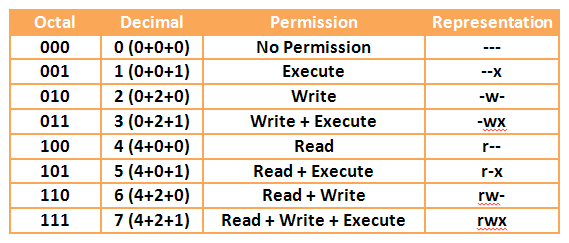
so each group can have a number from 0 → 7 each having a permission combination!
some common permissions:
- 664 - File Baseline (rw → owner, group, and r → others)
- 755 - Directory Baseline (rwx → owner, rx→ group, others)
for a dir execute means ability to change into the directory!
- 400 - Key pair (r - owner, no permissions → others)
Links:
202509230044