access control
- everything in linux is an object and every object has an owner!
- admin account → root (super user) can own every object!
- every object (file or process) that is run by a user has the same permissions as the user
- all users belong to a group
whoami # check the current user
id # check groups that user is part of- to act as a root user use the command:
sudo -i # grants root privilegesuser account management
- /etc/passwd
- the /etc/passwd stores a list of the system’s accounts, giving for each account some useful information like user ID, group ID, home directory, shell, and more.
root:x:0:0:root:/root:/bin/ash
bin:x:1:1:bin:/bin:/sbin/nologin
daemon:x:2:2:daemon:/sbin:/sbin/nologin
adm:x:3:4:adm:/var/adm:/sbin/nologin
lp:x:4:7:lp:/var/spool/lpd:/sbin/nologin
sync:x:5:0:sync:/sbin:/bin/sync
shutdown:x:6:0:shutdown:/sbin:/sbin/shutdown
halt:x:7:0:halt:/sbin:/sbin/halt
mail:x:8:12:mail:/var/mail:/sbin/nologin- The /etc/passwd contains one entry per line for each user (user account) of the system. All fields are separated by a colon (:) symbol. Total of seven fields as follows.
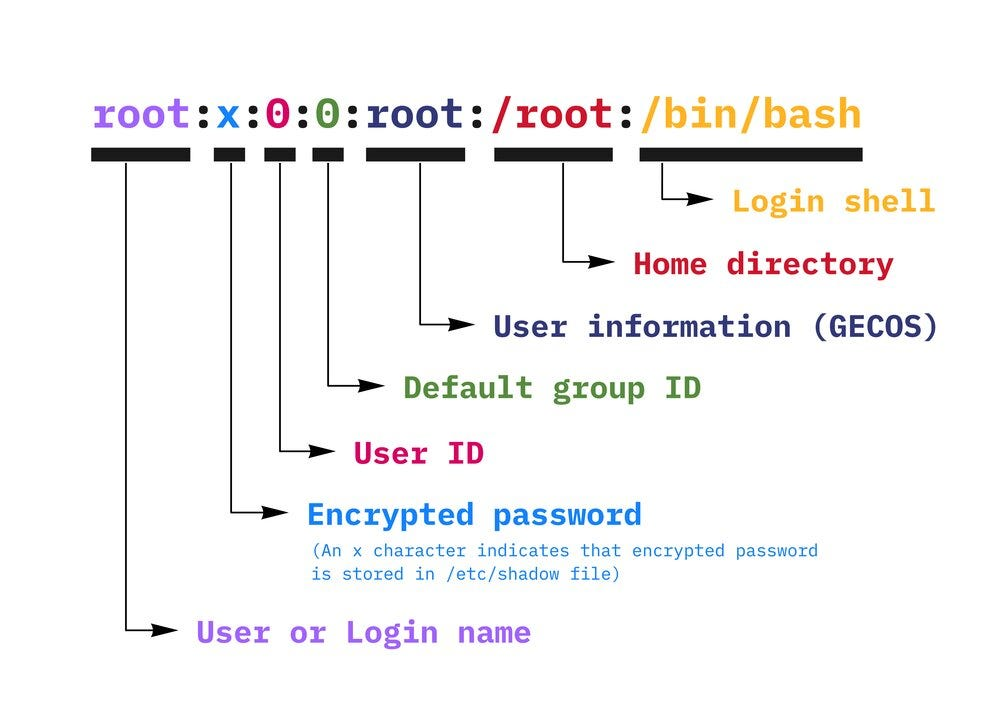
1 → username (1-32 chars) 2 → password (x → encrypted, salted pwd → /etc/shadow) 3 → user id (0 → root, 1-99 → predefined account, 100-999 → system account) 4 → group id (the primary group id stored in /etc/group file) 5 → GECOS info or user id info (extra info about the user name, phone number etc) 6 → home dir (path the user will be in when they login) 7 → command/shell (the abs path of the command or shell)
Note: Typically, this is a shell. Please note that it does not have to be a shell. For example, sysadmin can use the nologin shell, which acts as a replacement shell for the user accounts. If shell set to /sbin/nologin and the user tries to log in to the Linux system directly, the /sbin/nologin shell closes the connection. If the user entry in the /etc/passwd file doesn’t have an entry in the shell field, the user gets a Bourne shell (/bin/sh).
Note: so many of the system processes have accounts and these accounts have power to make changes to the file system, so when using containerizing tools, we should be careful as to trimming down these accounts, as they can act as security vulnerabilities!
- /etc/shadow
root:*:20283:0:99999:7:::
daemon:*:20283:0:99999:7:::
bin:*:20283:0:99999:7:::
sys:*:20283:0:99999:7:::
sync:*:20283:0:99999:7:::
games:*:20283:0:99999:7:::
man:*:20283:0:99999:7:::
lp:*:20283:0:99999:7:::
mail:*:20283:0:99999:7:::
news:*:20283:0:99999:7:::
uucp:*:20283:0:99999:7:::
proxy:*:20283:0:99999:7:::
www-data:*:20283:0:99999:7:::
backup:*:20283:0:99999:7:::
list:*:20283:0:99999:7:::
irc:*:20283:0:99999:7:::
_apt:*:20283:0:99999:7:::
nobody:*:20283:0:99999:7:::
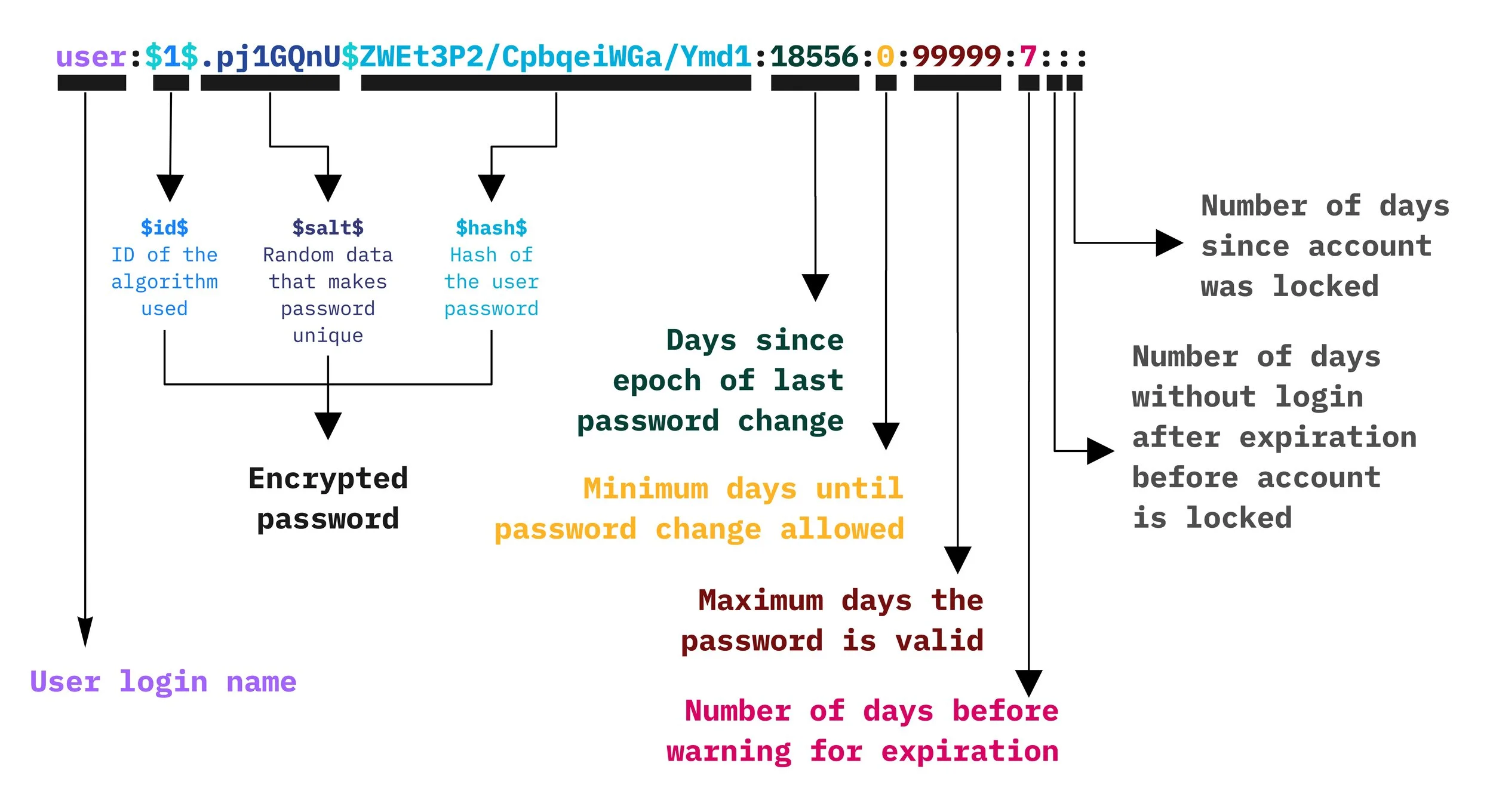
ubuntu:!:20283:0:99999:7:::- The shadow file stores the hashed passphrase (or “hash”) format for Linux user account with additional properties related to the user password.
Links:
202509250915