What is Docker?
Docker is a tool that implements containerization and helps us create containers, manage them, store and share them!
- an application for developing, shipping and running applications in containers, simplifies the process of container management!
- helps to containerize an application and containers could be as low as 50MB.
- simply put docker is a way of containerizing an application but is a better alternative than creating a VM!
docker can be run by both docker desktop and rancher read rancher-desktop vs docker-desktop
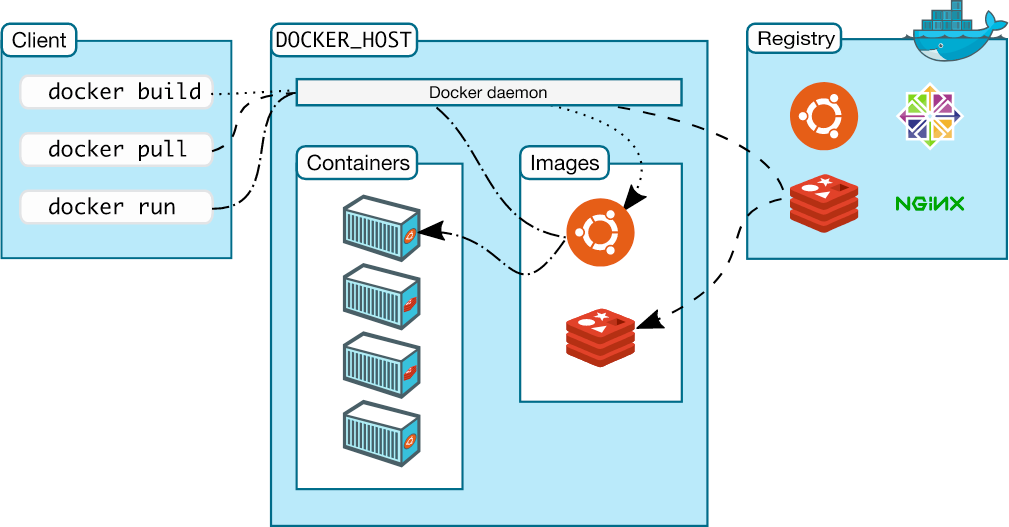
architecture of docker
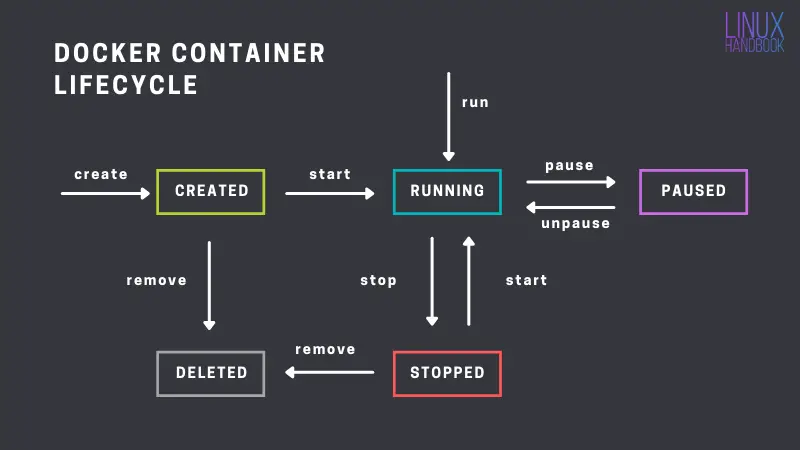
lifecycle of docker containers
components of docker
- dockerfile - is a script containing a series of instructions and commands for building a docker image
- image - blueprint for creating containers
- container - a container that runs on the docker daemon
dockerhub is a repository for storing docker images just like github stores codebases
more understanding of docker - https://github.com/iam-veeramalla/Docker-Zero-to-Hero
dockerd
- docker daemon listens for Docker API requests and manages Docker objects such as images, containers, networks, and volumes. A daemon can also communicate with other daemons to manage Docker services
Docker client ⇒ Docker API ⇒ Docker Daemon
installation
# when installing docker on a new system update the packages first
sudo apt update -y
sudo apt install docker.io -y

# common-mistake -> don't forget to grant user access to docker daemon
docker run hello-world

# if you get permission denied - either docker daemon is not running, or user does not have access to run docker commands

sudo systemctl status docker # check if docker daemon is started and active

sudo systemctl start docker # to start docker daemon

sudo usermod -aG docker ubuntu # grant access to your user to run the command
# here in the above command ubuntu is the name of the user and we are adding the user in the docker linux group!
commands
docker ps # list running containers

docker ps -a # list all containers

docker images # list all images

docker pull {image}:tag # pull an image with a specific tag

docker run {image}:tag # run a container using an image
# if the image is not present it fetches it first

docker run -d {image}:tag # run in detached mode - no logs

docker logs {container-id} # print logs

docker run -d -p 8080:80 nginx
# forwards container port 8080 -> port 80 of localhost

docker build -t {name}:tag .
# build the docker image from the dockerfile in pwd

docker exec -it <container_id or name> /bin/bash
# enter docker container

# kill all containers
docker stop $(docker ps -a -q)
docker kill $(docker ps -a -q)

# delete a docker image
docker rm -f <image-name>
Links:
202509301423