K8s Ingress
why is K8s ingress even needed? - problems with K8s service
Imagine you are a company http://onlinestore.com and you want to expose your application to your users using k8s, a simple way to do it would be to expose your services as LoadBalancer type in k8s for example:
onlinestore.com/shop→ shopping service in k8s clusteronlinestore.com/wear→ video streaming service in the clusteronlinestore.com/payment→ payment service in the cluster and so on…
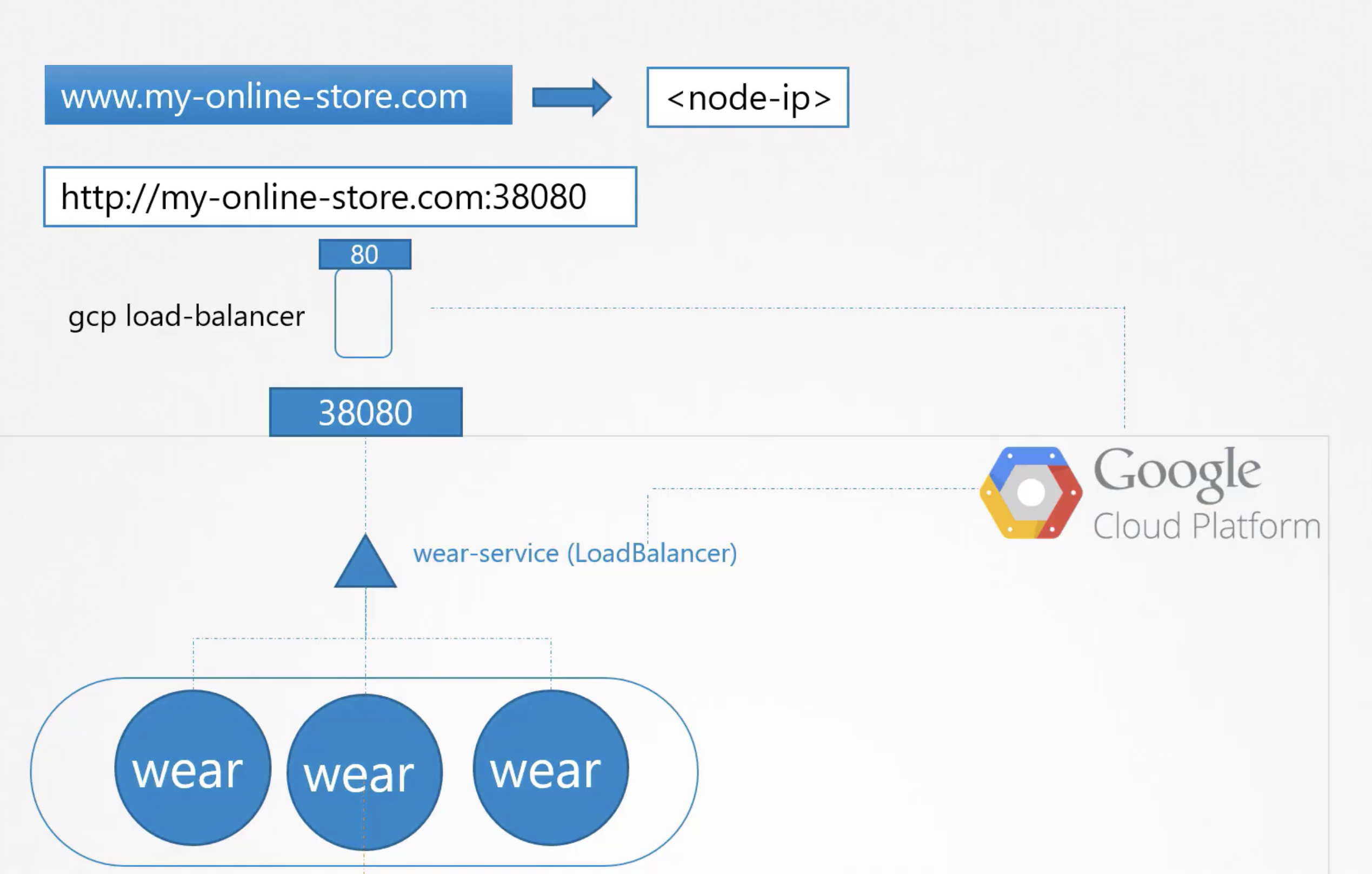
but each of these services when deployed as a LoadBalancer in k8s requests a static public IP from your cloud provider which has some major issues:
- You need to pay extra for each static ip you request from your provider based on the amount of requests on it!
- You need a way to configure the different possibilities to route to different services based on path based routing or url based routing using another proxy of some sort on top of these load balancers that contains the rules for these re-directions ex:
login.onlinestore.com→ login service (url based)onlinestore.com/cart→ cart service (path based)
- If you wish to serve your content over https to ensure SSL security, then you must also have a TLS terminator somewhere in the network, which may vary for different applications ex- /wear might want to terminate TLS at L7, while /video might want it at L2 which needs developer collaborations and organized efforts!
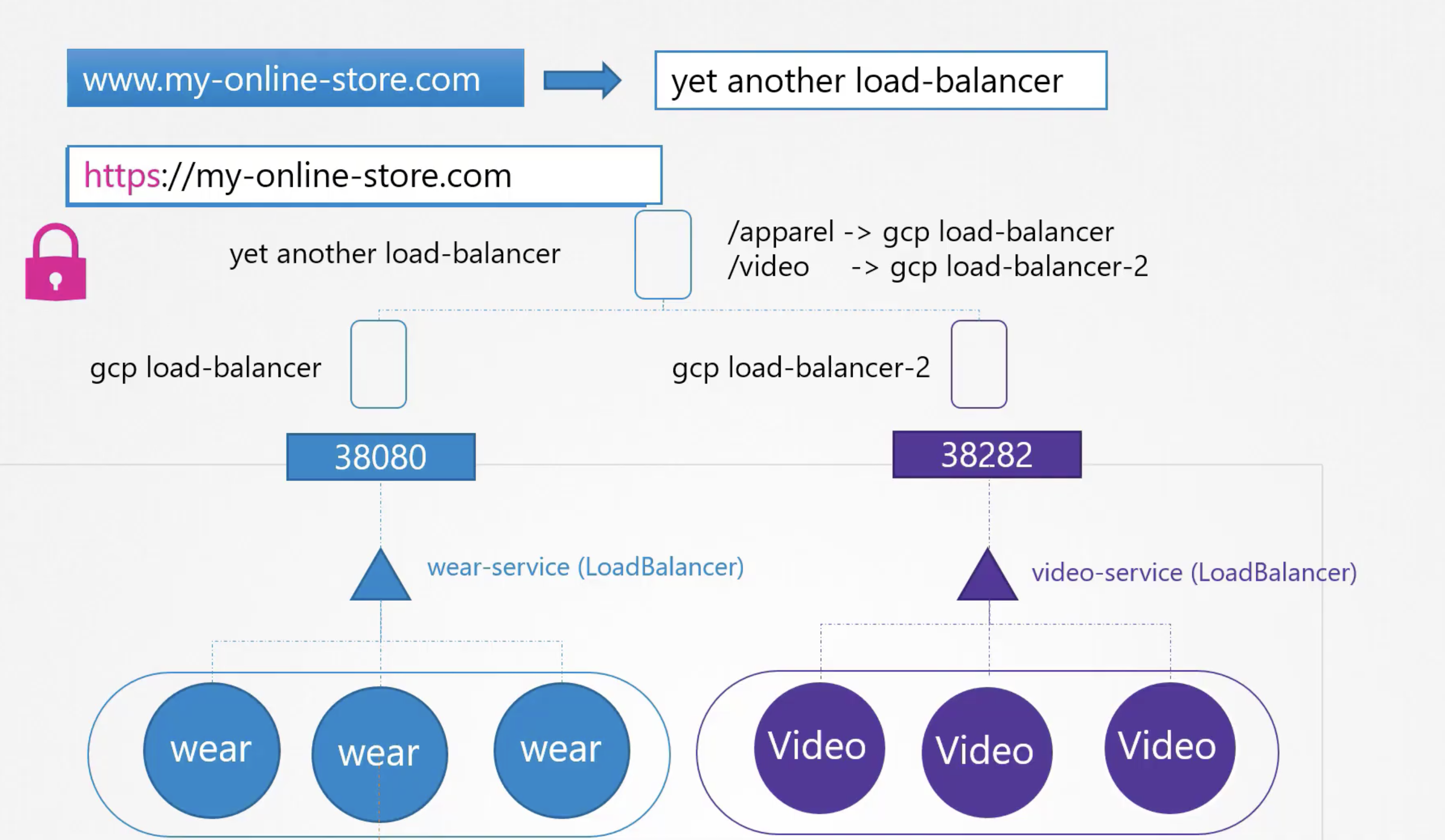
- also k8s service does not offer enterprise loadbalancing algorithms like sticky sessions, path based sessions, host based sessions, ratio based sessions etc (it only provides a simple loadbalancer using the round robin algorithm)!
Wouldn’t it be nice if k8s had some sort of inbuilt feature like pods, depl, svc that could solve these problems??? - why not another resource that stays on the cluster as another manifest file!
solution - enter ingress!
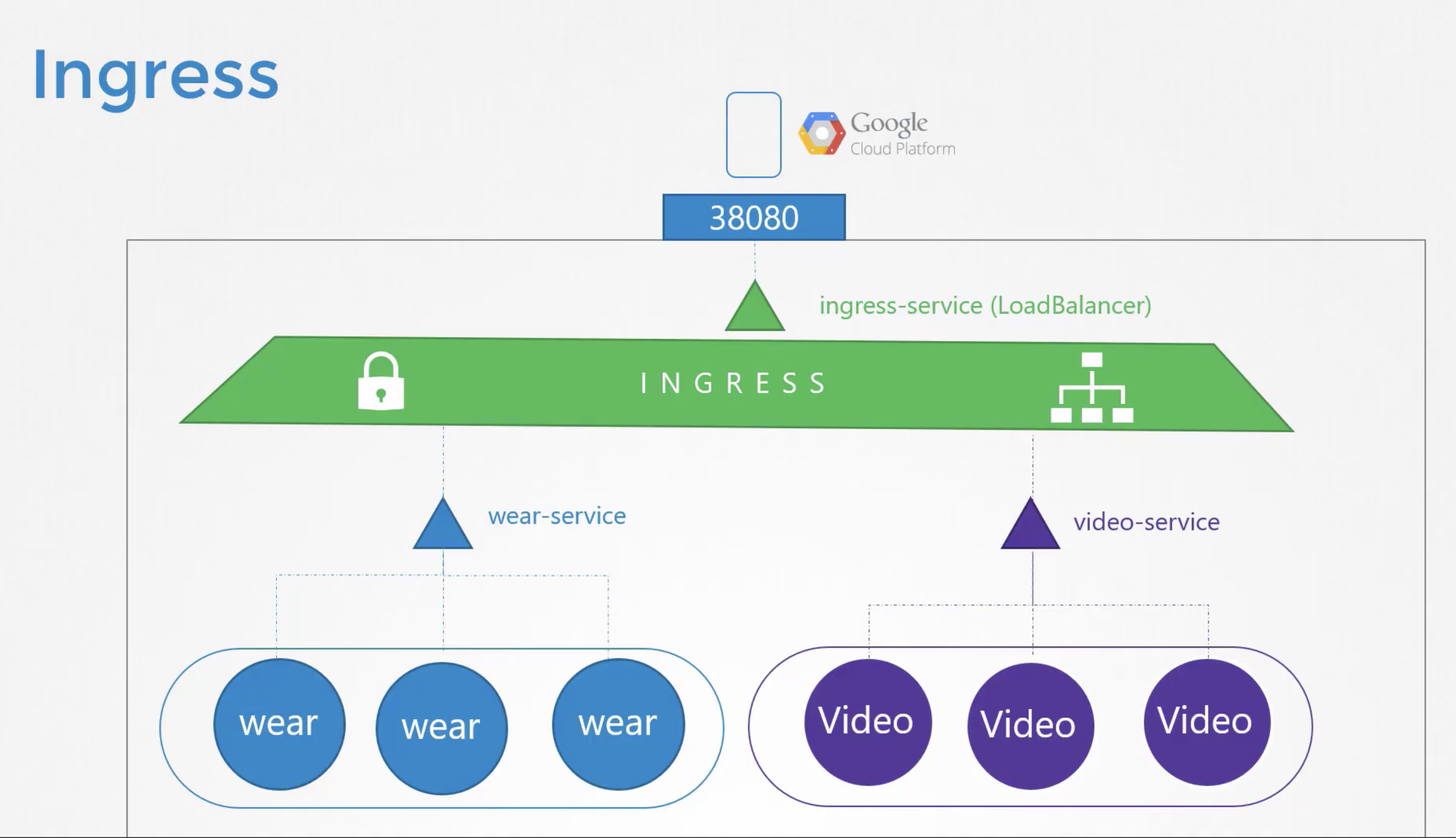
Ingress is a resource in k8s that takes care of these problems - loadbalancing, SSL termination and the benefit is it needs to be exposed as only a single public static IP address which serves the entire app!
what is ingress exactly and how it works?
ingress is a combination of an ingress controller and an ingress resource, there are many loadbalancers or proxy providers in the market ex- nginx, haproxy, traefik, kong, apache etc! and it is impossible for k8s to write the logic for all of them so:
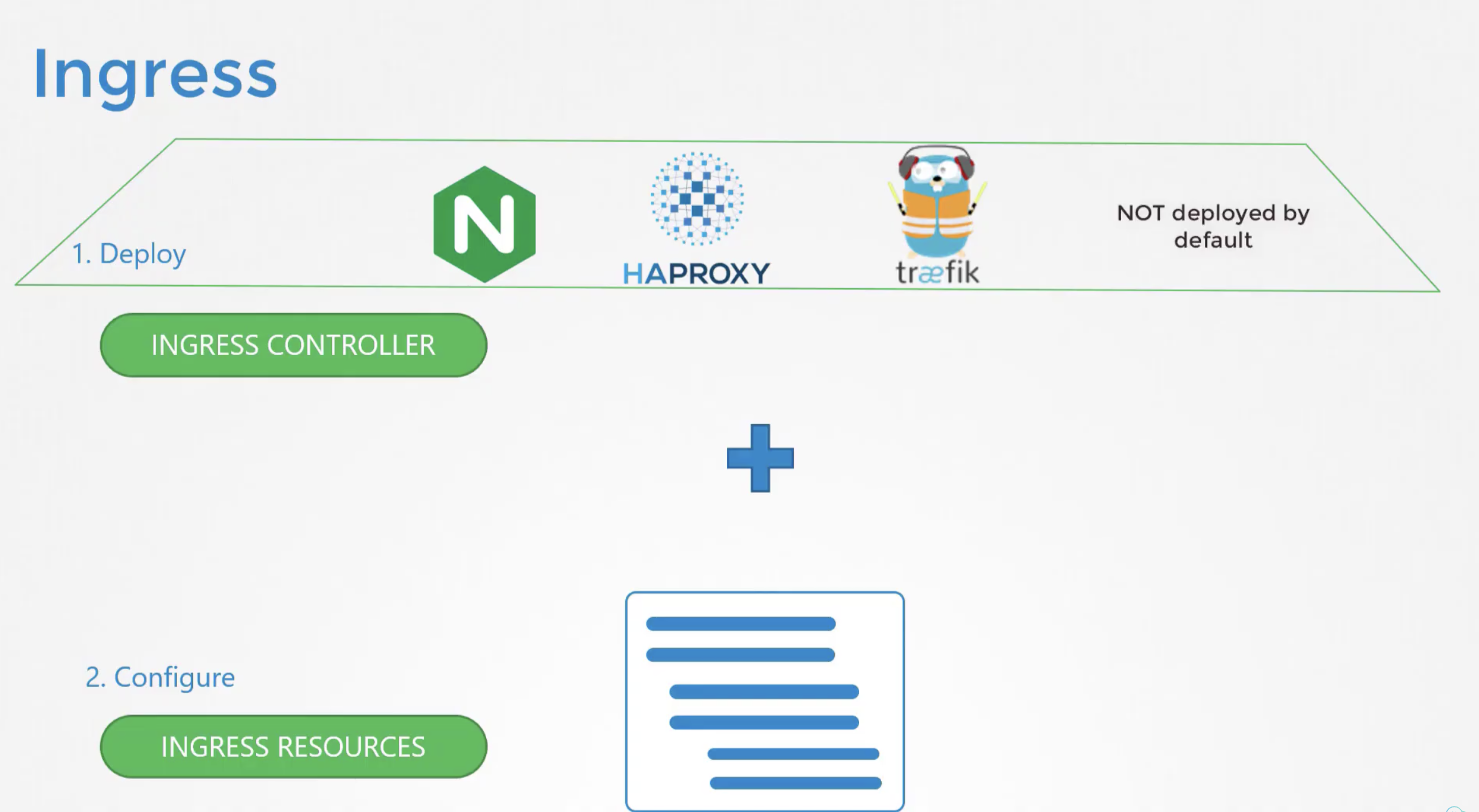
- K8s came up with a solution that since they cannot write the logic for all the different kind of loadbalancers like nginx, haproxy, f5 etc. it asked them to write an ingress controller for k8s which can be implemented by the customer as per his choice of load balancer.
- so now the user just needs to decide which loadbalancer he wants to choose for his application and first create an ingress controller for the same and then simply create an ingress resource with an ingress rule for all his services!
Note: k8s doesn’t have a default ingress controller and an ingress resource without an ingress controller is of no use! The way it works is the ingress controller keeps checking the cluster resources to find an ingress resource of its kind ex- nginx and when it does, it creates a custom loadbalancer based on the resource! So you always first have to install the ingress controller and then create the ingress resource :)
for example if you want to check out the deployment for this controller you can run this command after installing the controller in your cluster:
k edit deployments.apps ingress-nginx-controller --n=ingress-nginxthings to know
- ingress is a resource on the cluster
- ingress exposes http and https routes from outside the cluster to services within the cluster
- provides SSL and TLS termination
- helps route external URLs or FQDNs
- path based routing is allowed too!
- ingress resource is implemented by Ingress Controller similar to any other k8s resource like pods, svc, depl, namespace etc.
- ingress controllers like - nginx, traefik, cilium, cloud: agic and many are supported by k8s!
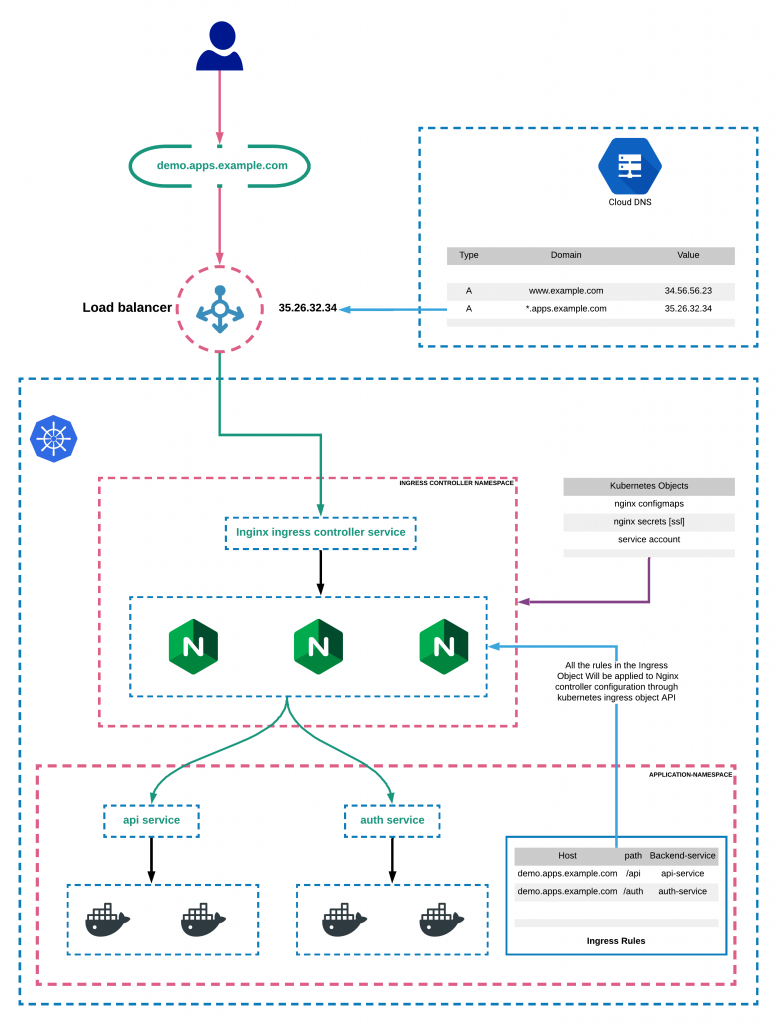
creating an ingress controller in rancher
we can simply create an ingress controller in a local rancher node using the following command
kubectl apply -f https://raw.githubusercontent.com/kubernetes/ingress-nginx/controller-v1.1.2/deploy/static/provider/cloud/deploy.yamlonce the nginx controller pod comes up and running we can create an ingress resource in our cluster!
Note: the default ingress controller in rancher-desktop is traefik, and it must be first disabled in order to install and run nginx-controller! It can be disabled in rancher-desktop settings directly
to check if the ingress controller pod is running or not use the command
kubectl get pods -A | grep nginxif you see a pod names nginx-controller running than the nginx controller is successfully deployed in the cluster!
creating an ingress resource
best when read from here - https://kubernetes.io/docs/concepts/services-networking/ingress/
an ingress resource is a set of rules that instructs the ingress controller to direct traffic based on paths, urls and patterns!
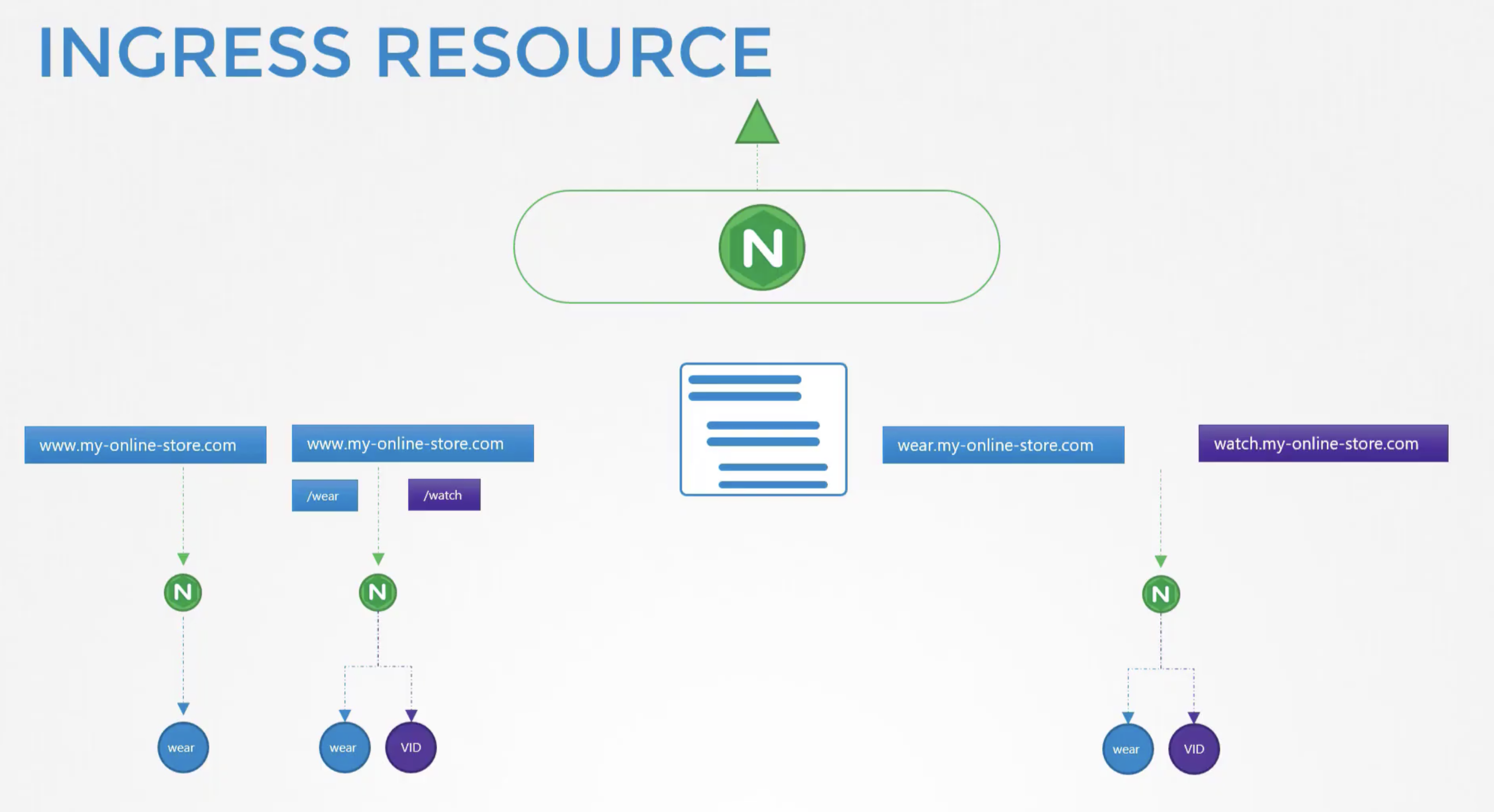
the ingress resource is created with a k8s manifest file as with any other resources like below:
apiVersion: networking.k8s.io/v1
kind: Ingress
metadata:
  name: ingress-onlinestore
spec:
  rules:
  - host: "onlinestore.com"
    http:
      paths:
      - pathType: Prefix
        path: "/wear"
        backend:
          service:
            name: wear-service
            port:
              number: 80
	  - pathType: Prefix
		path: "/watch"
		backend:
		  service:
			name: watch-service
			port:
			  number: 80
  - host: "login.onlinestore.com"
    http:
      paths:
      - pathType: Prefix
        path: "/auth"
        backend:
          service:
            name: auth-service
            port:
              number: 80
  - host: "*.onlinestore.com/*"
    http:
      paths:
      - pathType: Prefix
        path: "/forbidden"
        backend:
          service:
            name: forbidden-404-service
            port:
              number: 80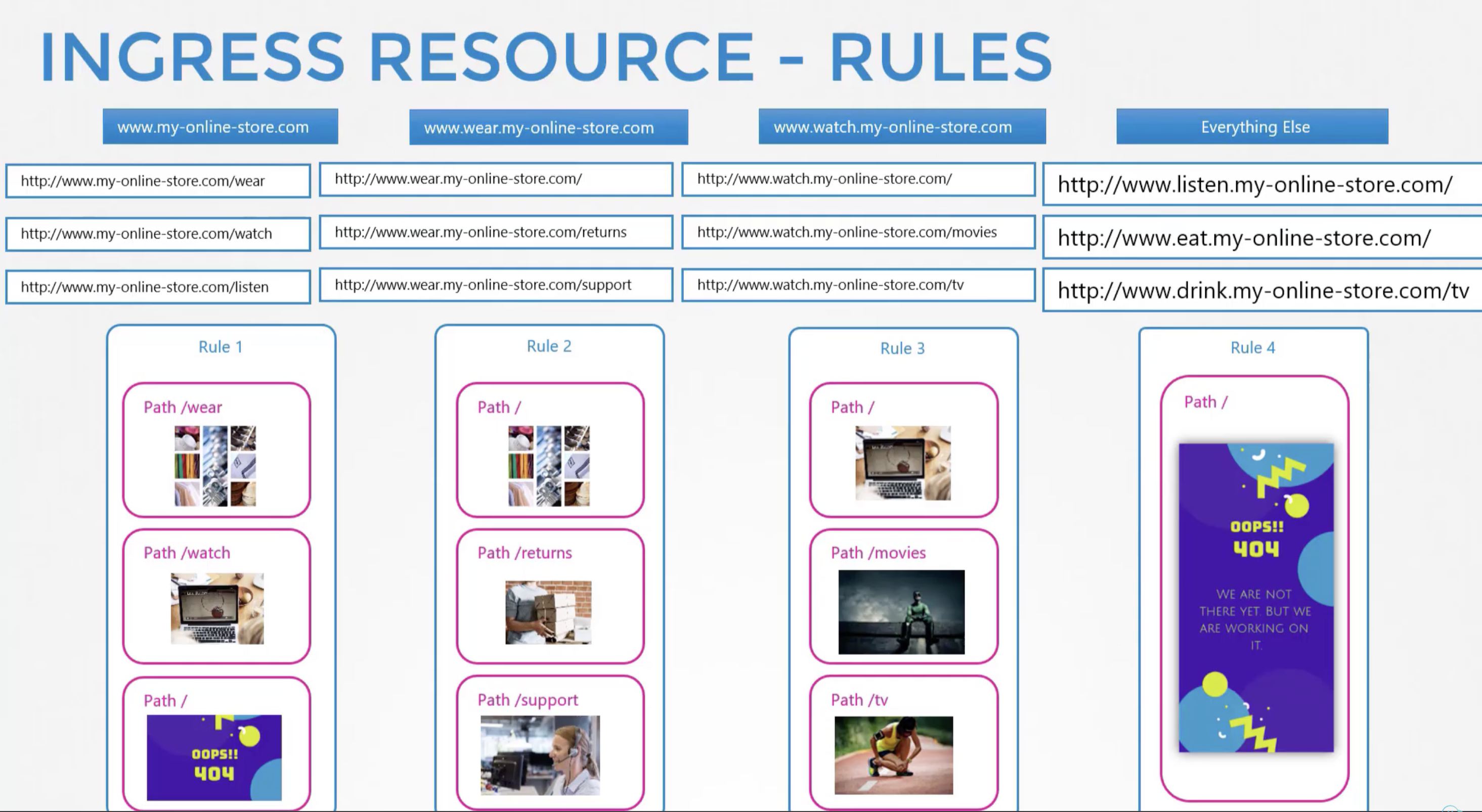
Note: there is also a concept of default backend, if no rules match in the ingress resource, the traffic is redirected to a default-http-backend:80 service which must be deployed in the cluster! It’s usually a 404 not found page or a forbidden page!
~aniket
Links:
202509010120