Docker Networking
best when read from here - https://docs.docker.com/engine/network/
Docker architecture has a simple networking structure where all the docker containers are connected to a single network called the bridge network by default also known as docker0 and using docker0 it can communicate with the host or other docker containers in the host. It can also communicate outside the host using the host network!
The issue with this is however that sometimes we might have critical applications in a container ex- payment related containers or containers containing any crucial data that should be allowed common access, in this situation the security of such a container is compromised so docker has customized networking options where users can create separate bridge networks for separate containers to create an isolation between containers.
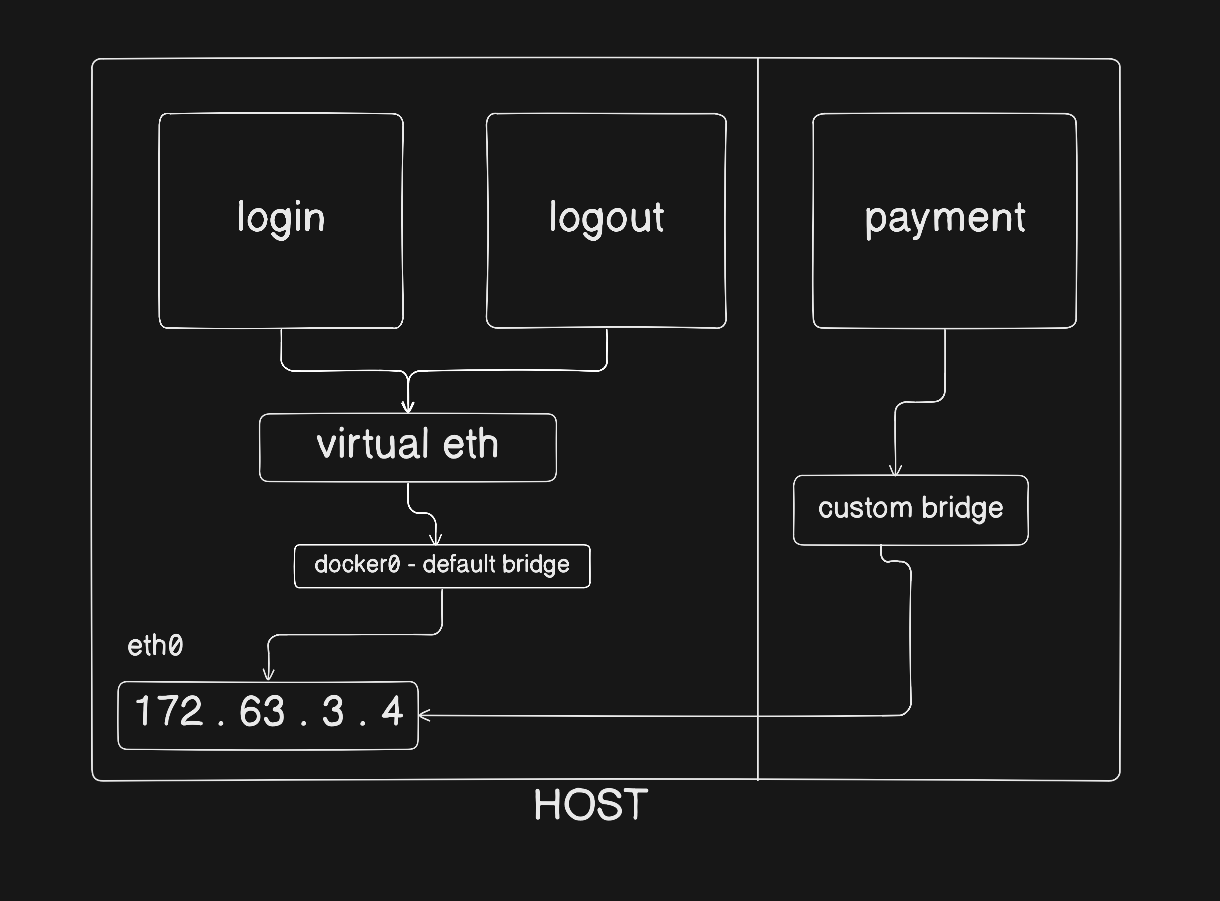 if you were to log into the login container and ping the ip of the logout container that would work because both are in the same bridge network!
# to check the ip address of the container
docker inspect login

# to log into the container
docker exec -it login /bin/bash

ping 172.17.0.3 # ping logout container
Now let’s see how we can create a custom bridge and assign it to a container!
# create a bridge network
docker network create secure-network

# list all docker networks
docker network ls

# assign the custom bridge network to a container
docker run -d --name payment --network=secure-network nginx:latest
Note: now we would not be able to ping to login or logout containers from the payment container as they are logically isolated!
To create a container directly in the host network we can make —network=host
Links:
202603200125