Containers
- The major difference between Containers and Virtual Machines are Containers run on a single host operating system and doesn’t have its own full Operating System unlike Virtual Machines!
- Containers have a small mini OS which contains the application code, application libraries and the system requirements to run the app!
- So, technically many Containers running on the same VM are not logically isloated from one another and can still talk to each other directly or through the host OS! But VMs are completely isolated as the hypervisors let them have their own independent Operating Systems!
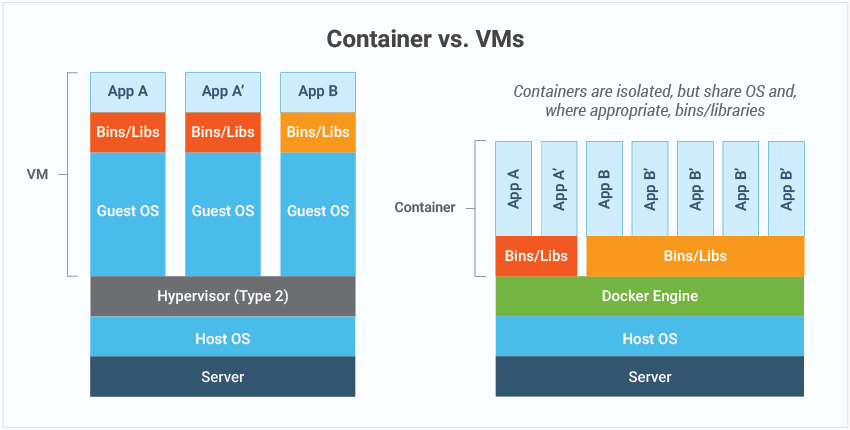
Containers vs VMs
- a container is a packaging of software code with just the operating system (OS) libraries and dependencies required to run the code to create a single lightweight executable
- more portable and resource-efficient than virtual machines (VMs)
- In simple words these can be consider tiny units of machine responsible for running an instance of application
the core difference in VM and Containers are containers virtualize the OS while VMs virtualize the hardware, hence containers are lightweight and faster to run!
| Feature | Containers | Virtual Machines |
|---|---|---|
| Virtualization Level | Operating System (OS) layer | Hardware layer |
| Resource Usage | Lightweight, fewer resources | Resource-intensive, higher overhead |
| Startup Time | Fast (seconds) | Slower (minutes) |
| Isolation | Process-level isolation | Full OS isolation |
| Kernel | Shares the host OS kernel | Each VM has its own kernel |
| Portability | Highly portable, move easily | Less portable, larger images |
Files and folders in containers base image
    /bin: contains binary executable files, such as the ls, cp, and ps commands.

    /sbin: contains system binary executable files, such as the init and shutdown commands.

    /etc: contains configuration files for various system services.

    /lib: contains library files that are used by the binary executables.

    /usr: contains user-related files and utilities, such as applications, libraries, and documentation.

    /var: contains variable data, such as log files, spool files, and temporary files.

    /root: is the home directory of the root user.
Files and folders that containers use from host operating system
The host's file system: Docker containers can access the host file system using bind mounts, which allow the container to read and write files in the host file system.

- Networking stack: The host's networking stack is used to provide network connectivity to the container. Docker containers can be connected to the host's network directly or through a virtual network.

- System calls: The host's kernel handles system calls from the container, which is how the container accesses the host's resources, such as CPU, memory, and I/O.

- Namespaces: Docker containers use Linux namespaces to create isolated environments for the container's processes. Namespaces provide isolation for resources such as the file system, process ID, and network.

- Control groups (cgroups): Docker containers use cgroups to limit and control the amount of resources, such as CPU, memory, and I/O, that a container can access.
more on containers
- https://www.infoq.com/articles/build-a-container-golang/
- https://www.reddit.com/r/docker/comments/jexmjt/build_your_own_container_using_less_than_100/
Links:
202603181502