docker compose
best when read from here - https://docs.docker.com/compose/
docker compose is useful when we want to run and manage multiple containers in a single host using a single command!

difference in running containers using plain docker vs docker-compose!
Let’s take the classic voting app example by docker -
only docker
docker run -d --name=redis redis # run the redis container

docker run -d --name=db postgres # run the postgres container

docker run -d --name=vote -p 5000:80 voting-app # run the voting-app image and fwd the container port 80 to host port 5000

docker run -d --name=result -p 5001:80 result-app # run the result-app image and fwd the container port 80 to host port 5001

docker run -d --name=worker worker # run the worker microservice

# since the voting container needs to connect to the redis container we can link it to the same using --link
docker run -d --name=vote -p 5000:80 --link redis:redis voting-app

docker run -d --name=result -p 5001:80 --link db:db result-app

docker run -d --name=worker --link db:db --link redis:redis worker
but a simpler way to do this would be to use a single docker-compose yaml file and declare them somewhat like this:
redis:
 image: redis
db:
 image: postgres:9.4
vote:
 # image: voting-app
 build: ./vote # when an image needs to be build before specify path
 ports:
  - 5000:80
 links:
  - redis
result:
 # image: result-app
 build: ./result
 ports:
  - 5001:80
 links:
  - db
 worker:
  # image: worker
  build: ./worker
  links:
   - redis
   - db
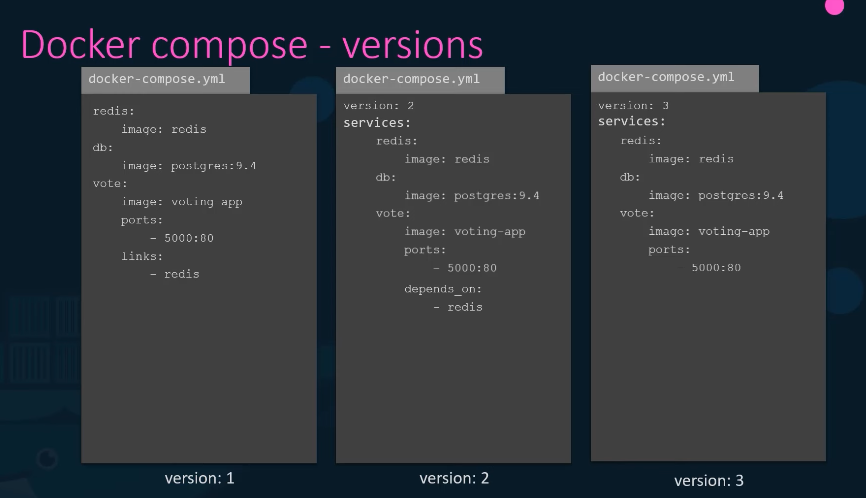
docker-compose versions
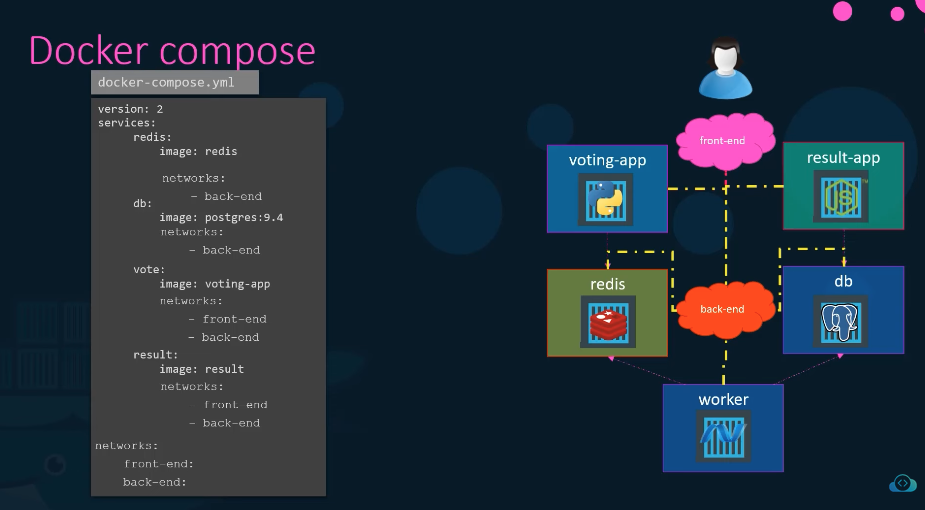
docker-network
Links:
202604091736